
The steps below detail how to update the Eque2 EValuate application and database.
Download
The latest release of Eque2 EValuate is:
EValuate 6.0.12
This can be downloaded from the following site:
| 32 bit will show (x86) next to the version number |  |
| 64 bit will show (x64) next to the version number |  |
Check the Database Location and Name
This information is required when you come to upgrade the database.
Open EValuate and note the Database Name and Database Location as shown at the bottom of the home page:

Installing the Upgrade
This needs to be done on each computer running EValuate. Download and extract the upgrade using the link above.
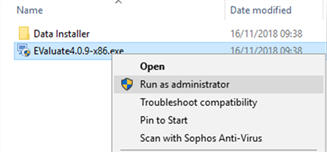
Right click the EValuateX.exe (where X relates to version number) and select Run as administrator:
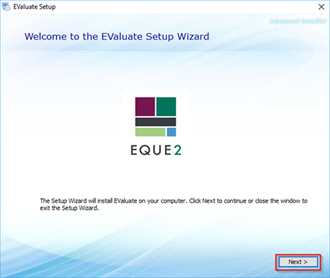
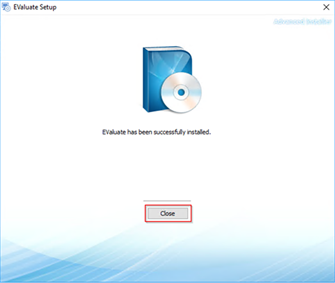
 Follow the Install prompts as shown below. There should be no need to change and of the default installation options.

Upgrading the Database
This only needs to be done once and can be completed on any computer running EValuate.
Open the Data Installer folder from the download package. Right click DataInstaller.exe and click Run as administrator: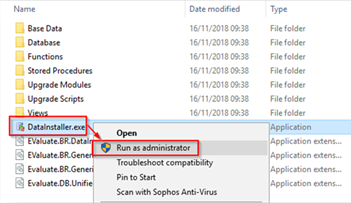
Ensure the Server Name and Database Name match the details noted in EValuate earlier. Ensure Perform Backup is selected and press Go. The utility states what version the data is current on and what version it will be upgraded to.
 button to browse for available servers and then select the correct one from the drop down box. Once selected use the
  button to connect to the server before selecting the database from the drop down box.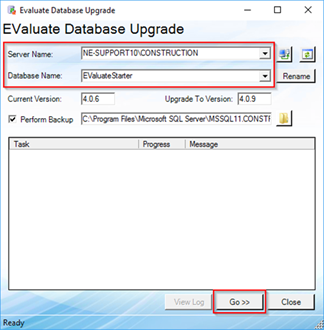
You are now prompted once the Data Installer has upgraded the database. Select OK and close the Data Installer Utility.
The EValuate application and database have now been upgraded. You can now open EValuate as normal.