EValuate may be installed in one of two configurations.
The first is a stand-alone install, in which a single machine hosts all of the components necessary to run EValuate. This includes Microsoft SQL Server and the EValuate application.
The second is a client-server install, which is designed to allow multiple clients to connect to the same central database for the purposes of sharing data. The server would hold the Microsoft SQL installation and database and the EValuate application would be installed on the client machines.
Hardware requirements will vary dependent upon other software installed and running on the machine(s) in question, but the following can be taken as a suitable minimum specification required.
Architecture
Evaluate is a .NET Framework V4.8 windows desktop application connecting to a shared SQL Server Database.
It is highly recommended that the application and the SQL Server Database run on the same LAN for performance purposes.
The Application may be configured to connect to the SQL Database either Via Windows authentication or SQL standard authentication.
Hardware Requirements
Minimum Requirements
| Configuration | RAM | Processor | Disk Space | Network |
| PC Client | 4 GB | Any | 350 MB | 100 Megabit + |
| Server | 8 GB | First 25 users - 2 cores +1 core per 50 users | 350 MB + Data* | 100 Megabit + |
| Stand Alone - Where Application and Server are the same machine | 8 GB | Dual Core | 350 MB + Data* | N/A |
| Application Server e.g. Citrix | 300 MB per user | 1 core per 25 users | N/A | 100 Megabit + |
Recommended Requirements
| Configuration | RAM | Processor | Disk Space | Network |
| PC Client | 8 GB | Any | 350 MB | 1 Gigabit + |
| Server | 16 GB +1 GB per 10 GB of Data | First 25 users - 2 cores +1 core per 50 users | 350 MB + Data* | 1 Gigabit + |
| Stand Alone - Where Application and Server are the same machine | 16 GB | Dual Core | 350 MB + Data* | N/A |
| Application Server e.g. Citrix | 500 MB per user | 1 core per 15 users | N/A | 1 Gigabit + |
*Data requirements will vary significantly dependent upon usage but as a rough guideline allow for 1 GB per user per year.
Software Requirements
Supported Operating Systems
| Client Operating System | Server Operating System |
| Windows 10 | Windows Server 2016 |
| Windows 11 | Windows Server 2019 |
| Windows Server 2022 | |
| Windows Server 2025 | |
Supported SQL Server Versions
| Supported Versions of SQL Server |
| SQL Server 2012 32/64 Bit, Express*, Standard, Enterprise |
| SQL Server 2014 32/64 Bit, Express*, Standard, Enterprise |
| SQL Server 2016 32/64 Bit, Express*, Standard, Enterprise |
| SQL Server 2017 32/64 Bit, Express*, Standard, Enterprise |
| SQL Server 2019 32/64 Bit, Express*, Standard, Enterprise |
| SQL Server 2022 32/64 Bit, Express*, Standard, Enterprise |
| SQL Server 2025 32/64 Bit, Express*, Standard, Enterprise |
*The Express Edition of Microsoft SQL Server is free, however, it will only support database sizes up to 10 GB and can only utilise approximately 1 GB of memory.
**Only supported for EValuate 4.2 and earlier versions.
Any preinstalled Microsoft SQL server must be configured with the following parameters for use with EValuate:
- Mixed mode authentication – NOT REQUIRED FOR EVALUATE
- Collation of Latin1_General_CI_AS – NOT REQUIRED FOR EVALUATE, just requires a collation ending CI_AS
- SQL Server Browser enabled – ONLY REQUIRED where the SQL Installation is not the default instance.
- Named Pipes enabled
- TCP/IP enabled, and a static TCP port set for the SQL server
Other Software Requirements
- Microsoft .NET Framework 4.8 - Required. If not already installed, this will be installed during the EValuate Set-up. (Internet Access Required)
- Microsoft Excel (Office 2010 onwards) - Recommended installed on the clients. Certain reports and views in EValuate are presented in Excel. Without Excel, the user will not be able to view these reports.
- Outlook (Office 2010 onwards) - Recommended installed on the clients. EValuate provides hyperlinks for email addresses, which will start the default email client on the machine running the application.
- SMTP Service - Required if using Project Enquiry Centre module which will send emails from the EValuate to subcontractors. If using Office 365 the SMTP relay must be enabled, see https://technet.microsoft.com/en-us/library/dn554323(v=exchg.150).aspx
Additional dxAPI 2D Measure / BIM Measure Requirements
There are additional requirements and recommendations for the use of the optional dxAPI 2D Measure / BIM Measure modules. These can be viewed by clicking the link below:
Eque2 Construct integration
When integrating with Eque2 Construct, you can check the compatibility within EValuate in the configuration settings:
- Click Admin, then click Config then click Config again.
- Click Finance integration and click Test.
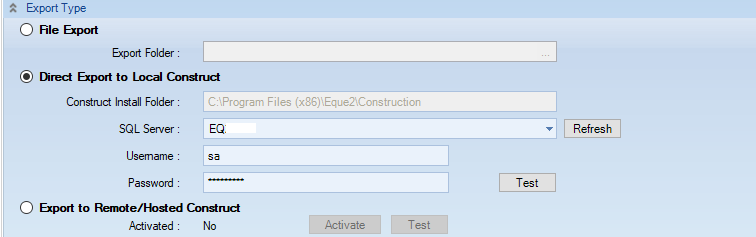
This test is coded as follows:
- For post contract integration minimum version of Construct is 24.4.29
- For non post contract direct integration min version is 20.0.90
- For non post contract remote/hosted integration min version is 23.0.23
Why VPN is not supported?
Although we are aware of several companies using VPN (Virtual Private Network) connections as a solution to access EValuate remotely, this is not a recommended or supported connection method.
EValuate may well work without issue using a VPN connection, but this was not the intended connection method for the program. Therefore, this has not been tested by development.
In the event that this is the only solution to access your software you may experience the following when using a VPN to access EValuate:
- Performance Issues- EValuate requires a constant, stable connection to SQL server (held on server PC), so there is a likely chance of reduced performance based on VPN bandwidth and configuration.
- Connection Issues- Depending on the VPN configuration you may experience issues connecting to SQL Server, or be unable to connect to SQL Server. 'Cannot generate SSPI context' is a common error message in these circumstances.
We do not support anyone experiencing Performance or Connection Issues when using a VPN connection.
Use of Remote Desktop or Citrix to access EValuate is a more secure and stable means of accessing the system.
When using Remote Desktop or Citrix, if the connection is interrupted the user can reconnect without compromising the integrity of the database.
Use of Remote Desktop or Citrix also requires less Internet bandwidth on the remote PC.